
Lower base rate
Start at US$2.96/user/month, billed annually, versus Zoho Premium at ₹280 or US$4 annually.
Independent buying comparison
View Zoho Projects pricingZoho Projects is a capable, budget-conscious option with strong automation and suite integration. Supista adds a lower rate, initial setup support, and AI-assisted customization.
Choose Supista when you want a focused implementation partner and published customization support. Choose Zoho when its wider business suite is central.
Current product view
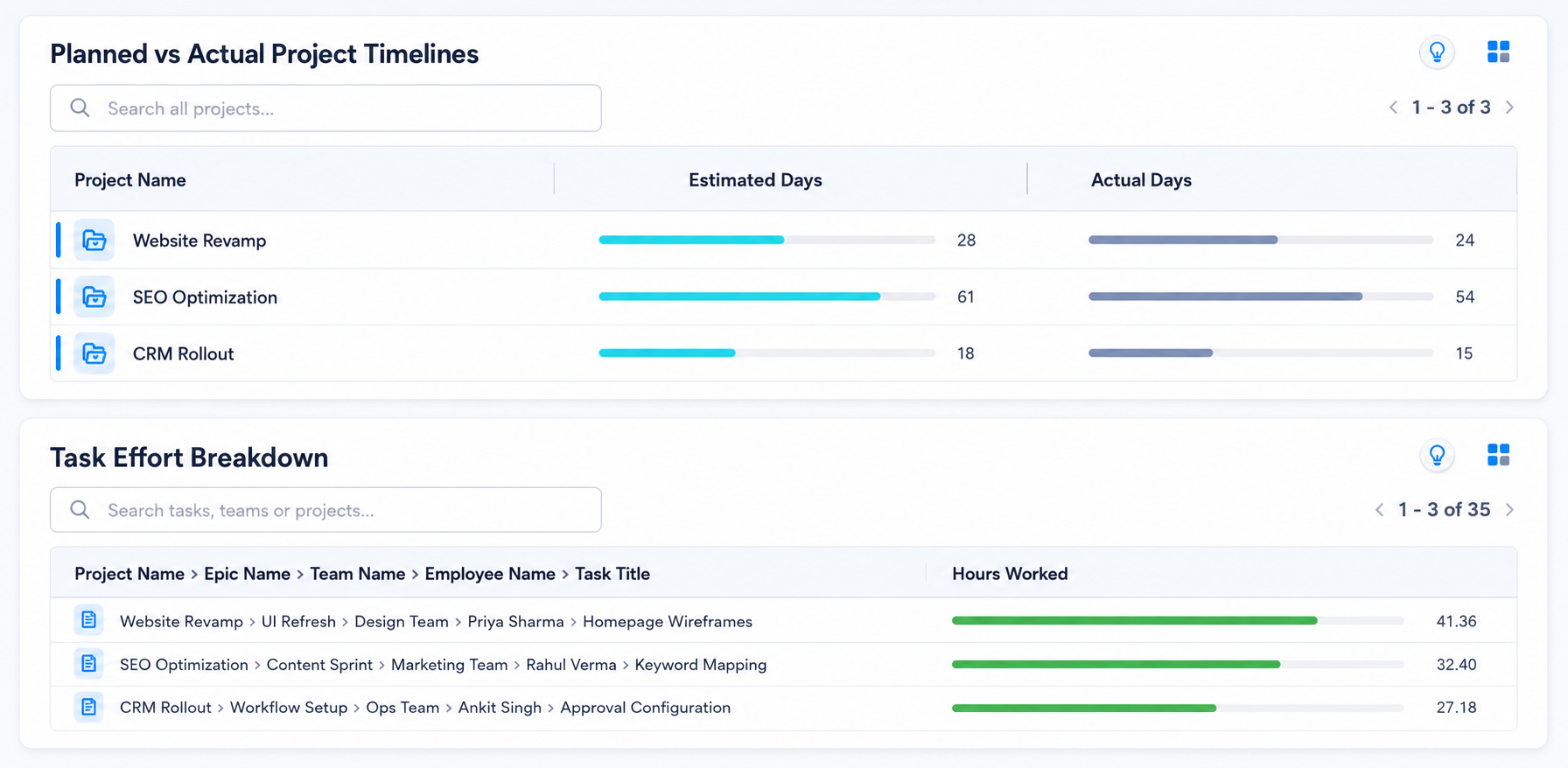
Review the live project signals, workflows, and exceptions your team would use before choosing a platform.
Side-by-side
Zoho Projects Premium is ₹280 per user monthly in India or US$4 in the US annually. Monthly billing is ₹350 or US$5. Regional checkout terms prevail.
| Feature | Supista Projects | Zoho Projects | Remarks |
|---|---|---|---|
| Published annual price | Included: US$2.96/user/month, billed annually | Included: US$4/user/monthPremium, billed annually | Supista has the lower published annual per-user rate for the displayed currency. |
| Task planning and reporting | Included: Tasks, dependencies, dashboards, workload, and audit history | Included: Tasks, Gantt, reports, timesheets, and project dashboards | Both provide mature project planning and reporting for SMBs |
| Budget and effort control | Included: Budget vs actual spend and planned vs actual effort | Included: Project budget, earned value, time logs, and timesheets on Premium | Both provide credible project financial and effort controls |
| Workflow automation | Included: Configured approvals, reminders, escalations, and handoffs | Included: Blueprints, workflow rules, webhooks, and 5,000 monthly executions | Zoho has strong self-configuration; Supista includes implementation time |
| Hands-on customization | Included: 20 specialist hours during initial setup; ongoing changes can use AI-assisted configuration, with extra expert work available at US$20/hour | Higher tier, add-on, or setup required: Custom modules and configuration tools; services are separately scoped | Supista includes a published 20-hour initial setup allowance plus AI-assisted ongoing configuration |
| Finance and procurement workflows | Included: Use connected finance and procurement modules on one data layer | Higher tier, add-on, or setup required: Connect Zoho Books and Invoice; procurement needs another app or configuration | Both can connect business processes; Supista is designed for cross-module operational flows |
| New operational module | Included: Create full modules manually or through AI-assisted generation | Included: Create project custom modules with Zia; global modules require Enterprise | Both support module creation; Supista extends it across broader ERP-style operations |
| Role-aware access | Included: Control projects, tasks, approvals, budgets, and reports by role | Higher tier, add-on, or setup required: Custom profiles and roles require Enterprise | Supista keeps role-based operational access in its project proposition |
Want to verify the workflow? Watch the WBS Expense Management tutorial .
US annual list prices were reviewed August 2026. Taxes, discounts, add-ons, usage charges, and seat minimums may change the total. Confirm the official checkout before buying.
Designed for SMB delivery
Start at US$2.96/user/month, billed annually, versus Zoho Premium at ₹280 or US$4 annually.
Get 20 specialist hours during initial setup, then use AI-assisted configuration for ongoing changes.
Configure roles, approvals, controls, and reports around one delivery process.
Extra customization is US$20/hour.
Balanced strengths
Compare the practical strengths of each platform before deciding which operating model fits your team.
Make the trade-off explicit
Verified sources
Feature packaging changes. These official pages support the comparison and should be rechecked for a final quote.
Common questions
Premium is ₹280 per user monthly annually or ₹350 monthly. Enterprise is ₹630 per user monthly annually. Verify live checkout before purchasing.
Supista's annual base rate is lower and includes 20 initial setup hours plus AI-assisted customization. Zoho remains compelling for teams using its wider suite.
Supista can replace Zoho Projects when your required workflows fit its project planning, cost, timesheet, approval, automation, RBAC, and reporting capabilities. Validate integrations and migration needs against a real project before switching.
The 20 hours are included once during initial setup at no extra charge. Use them to configure project and task forms, custom fields, workflows, role-based permissions, approval paths, automations, dashboards, and reports. The exact scope depends on complexity, and AI-assisted configuration can handle many ongoing changes afterward.
Yes. Supista combines project budgets, actual costs, timesheets, planned-versus-actual effort, and role-aware approvals in its published project plan.
Test the fit
Bring one approval, cost-control, or delivery process. See how it can work before you decide.
Book a free strategy session with our Automation Experts and discover how Supista’s AI-Composable ERP can transform your operations into a scalable and intelligent system.