
Revisions lose their history
BOQ quantities change, but teams circulate renamed spreadsheets. Buyers and commercial teams may work from different versions, creating incorrect package limits.
EPC BOQ and project cost control software
Built for commercial heads, quantity surveyors and project directors. Keep approved quantities, budget allocations, purchase commitments, subcontract bills and site expenses connected so cost exposure is visible before final accounts.
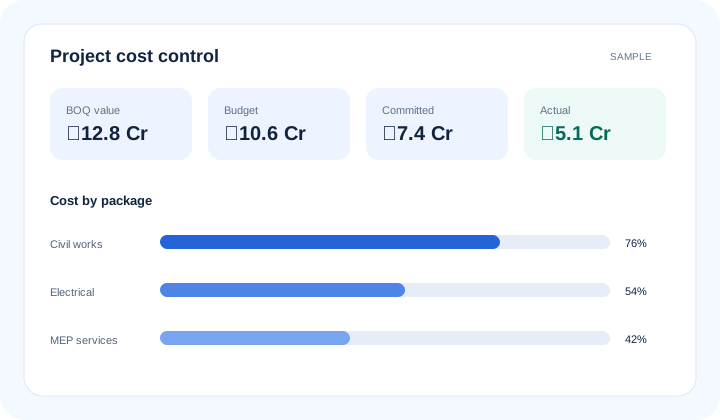
What is epc boq and project cost control software? EPC BOQ and project cost control software organises the Bill of Quantities (BOQ), approved budget, commitments, actual costs and forecasts by project, cost code and work package. BOQ value represents priced scope; budget is the approved spending limit; commitments are contracted amounts; actual cost is recorded expenditure; forecast cost estimates the expected final position.
The operational problem
BOQ quantities change, but teams circulate renamed spreadsheets. Buyers and commercial teams may work from different versions, creating incorrect package limits.
Management reviews posted costs while approved purchase orders and work orders sit elsewhere. The apparent budget headroom disappears when invoices arrive.
A package is over budget, but the report cannot show which order, bill, expense or quantity caused it. Corrective action becomes slow and disputed.
Connected EPC records
Cost control works when each commercial record retains project, WBS, package and cost-code context. A variance can then be traced from summary to purchase order, subcontract bill or site expense.
Core capabilities
Maintain controlled BOQ versions and revision context. Prevent teams from treating an obsolete quantity schedule as the current commercial baseline.
Allocate approved budgets by package, cost code or configured dimension. Give approvers the correct control limit before a commitment is made.
Bring approved purchase and subcontract commitments into cost reviews. Show exposure that has not yet become an invoice or paid cost.
Relate recorded invoices, subcontract bills and expenses to their cost context. Reduce manual reconciliation between accounts and project reports.
Compare budget, commitment and actual cost at a useful project level. Direct commercial reviews toward exceptions with material impact.
Combine available cost and progress records to support forecast reviews. Authorised teams retain responsibility for estimate-to-complete assumptions.
Open the orders, bills and expenses behind a number. Give reviewers evidence without distributing parallel spreadsheets.
Product walkthrough
A controlled cost review separates priced scope, spending authority, contractual exposure, recorded cost and expected final cost.
Operational takeawayThe view gives authorised teams a shared record for the next decision; it does not replace physical verification or professional judgement.
Feature workflow
Role-based value
See package commitments, actuals, forecasts and margin pressure before closeout.
Keep BOQ revisions, measured quantities and cost codes in controlled context.
Relate cost variance to progress, procurement and accountable work packages.
Trace project reports to the approved transaction or expense behind each value.
Lois AI in this workflow
Lois works with permitted Supista data and does not bypass configured validations, permissions or approvals.
“Why is the civil package above budget?”
“Show commitments not yet billed.”
“Summarise cost exposure for this project.”
Connected EPC lifecycle
Proof and deployment confidence
Implementation maps current BOQ structures, cost codes, budget ownership and approval paths before transactions move. Configurable fields and role-based access support control without turning every change into uncontrolled custom development.
Buyer questions
It connects BOQ scope, approved budgets, purchase and subcontract commitments, actual project costs and forecasts by project and work package.
BOQ value represents priced contractual scope or an estimate basis. Budget is the internally approved amount available for controlled spending against that scope.
Committed cost is covered by an approved order or contract but may not yet be billed. Actual cost is expenditure recorded through accepted invoices, bills or expenses under the configured accounting process.
Where connected records are available, authorised users can move from a package variance to relevant purchase orders, subcontract bills, invoices or expenses.
No. Available records can support forecast reviews, but authorised commercial and project professionals remain responsible for assumptions, estimate-to-complete and margin judgement.
Yes. Cost dimensions, fields, roles, validations and approval paths can be mapped during implementation, subject to the agreed design.
Use a real workflow
Bring a BOQ, budget and current cost report. We’ll show how commitments, actuals and source records can be controlled without losing your package structure.
Book a free strategy session with our Automation Experts and discover how Supista’s AI-Composable ERP can transform your operations into a scalable and intelligent system.