
Users work around the ERP
Required EPC fields, terms or approvals are missing, so teams recreate the real process in spreadsheets. System records become incomplete.
Customisable EPC ERP software
Built for EPC owners, process leaders and implementation teams. Configure modules, forms, fields, relationships, roles and approvals around the governed operating model instead of maintaining uncontrolled code forks.
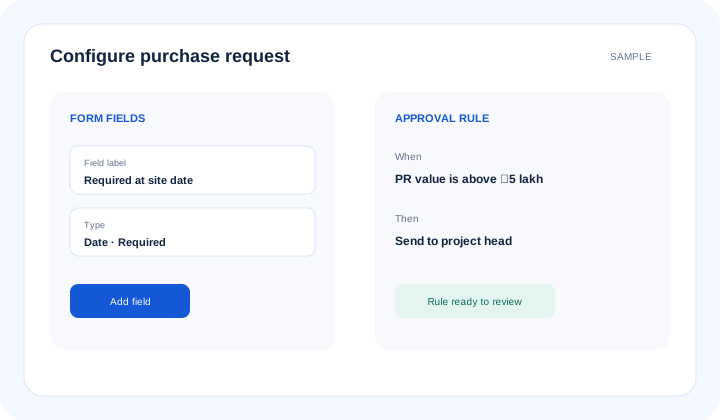
What is customisable epc erp software? Customisable EPC ERP software lets an organisation configure modules, forms, fields, terminology, record relationships, roles, permissions, approval paths, validations, notifications, dashboards and reports. Configuration changes governed product behaviour through managed tools; uncontrolled custom development creates separate code that is harder to maintain and audit.
The operational problem
Required EPC fields, terms or approvals are missing, so teams recreate the real process in spreadsheets. System records become incomplete.
Small form or routing changes require development and deployment. The process cannot adapt at the pace of active projects.
Fields and workflows are added without ownership, validation or access review. Different companies and projects use conflicting definitions.
Connected EPC records
A useful configuration defines the module, fields and relationships alongside roles, validation, approval, notification and reporting. This keeps project terminology flexible while preserving a governed source of truth.
Core capabilities
Shape supported modules around the agreed project process. Avoid forcing every team into unrelated generic records.
Add controlled fields, labels and required information. Keep definitions owned and documented during implementation.
Connect project, BOQ, activity, material, vendor and transaction records. Preserve context across team handoffs.
Use familiar names for approved process concepts. Improve adoption without changing the underlying governance informally.
Define who may view, create, change or approve records. Keep sensitive commercial and project data restricted.
Configure routing, required fields and business checks. Make changes through controlled design rather than hidden workarounds.
Build role-focused views from configured records and dimensions. Let each function review the information it owns.
Revise approved configuration as the operating model changes. Retain governance over who requests, tests and releases each change.
Product walkthrough
Process owners define what changes, authorised implementers configure it, and users receive tested forms, controls and reports.
Operational takeawayThe view gives authorised teams a shared record for the next decision; it does not replace physical verification or professional judgement.
Feature workflow
Role-based value
Approve which project and commercial outcomes the configuration must support.
Define forms, terminology, validations and handoffs used by the team.
Manage approved roles, fields, workflows and reporting configuration.
Work with familiar project terms and only the actions relevant to the role.
Lois AI in this workflow
Lois works with permitted Supista data and does not bypass configured validations, permissions or approvals.
“Which fields are required before this PR can move?”
“Prepare this supported record using our project terminology.”
“Show records waiting at this approval step.”
Connected EPC lifecycle
Proof and deployment confidence
No-code and low-code configuration uses supported controls for forms, relationships, roles and workflows. Requirements outside verified product capability should be confirmed during solution design rather than published or promised as available functionality.
Buyer questions
It lets organisations configure supported modules, fields, relationships, terminology, roles, approvals, validations, dashboards and reports around their governed EPC process.
Configuration changes supported product behaviour through managed controls. Custom development creates or changes code and requires separate design, testing, maintenance and product-team confirmation.
Company terminology, supported forms and fields can be mapped during solution design, subject to the agreed configuration and product capability.
Yes. Roles, permissions, required fields and approval routing are supported configuration areas and should be tested against the organisation’s authority matrix.
No. Process owners should approve definitions, access, validations and releases. Configuration should encode governance rather than let every user alter controls.
Multi-company requirements should be confirmed against the proposed design and supported deployment before commitment; terminology, roles and reporting boundaries may differ.
Many supported form, field, role and workflow changes can be handled through configuration. Requirements beyond current capability need product-team assessment.
Use a real workflow
Bring a form, approval matrix or process map. We’ll separate supported configuration from requirements that need product-team confirmation before commitment.
Book a free strategy session with our Automation Experts and discover how Supista’s AI-Composable ERP can transform your operations into a scalable and intelligent system.