
Users cannot find the right path
A site user knows the required outcome but not the correct module, form or field. The update waits for an experienced ERP operator.
AI ERP for EPC and construction
Built for EPC teams who need answers and actions without navigating every screen. Lois uses permitted ERP context, asks for missing information and prepares a preview before the normal workflow continues.
What is ai erp for epc and construction? AI ERP for EPC and construction combines a conversational interface with governed project records and workflows. Lois can retrieve permitted information, prepare supported ERP records and summarise operational risks. It requests missing facts, shows a preview for human confirmation and never bypasses configured permissions, validations or approvals.
The operational problem
A site user knows the required outcome but not the correct module, form or field. The update waits for an experienced ERP operator.
A project manager must open activities, orders, receipts and approvals to explain one delay. The answer is slow and difficult to reproduce.
Leaders worry that AI may invent values, expose restricted records or submit transactions without review. Adoption stalls unless the control flow is explicit.
Connected EPC records
The control flow is simple: ask, understand context, request missing information, prepare a preview, obtain user confirmation, then continue through the configured workflow and approval. Access is limited to the user’s permitted Supista data.
Core capabilities
Ask about projects, activities, materials, costs or bills within current permissions. Receive an answer grounded in available Supista records.
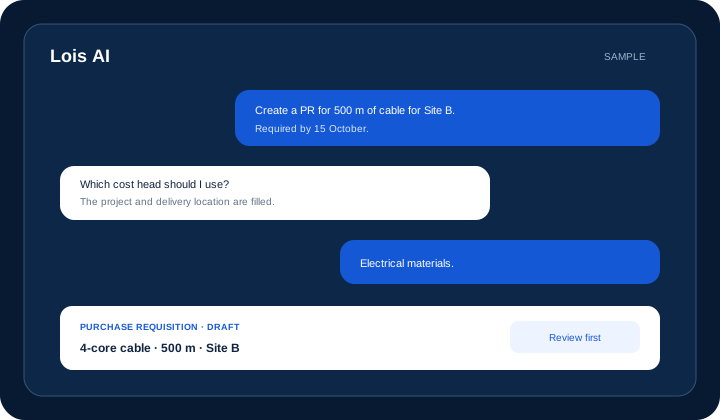
Describe a project requirement in plain language. Lois asks for missing fields and prepares a requisition preview.
Use supplied quotation information to prepare structured records. Buyers verify values and terms before saving.
Compare captured commercial fields using available data. Leave vendor selection and professional evaluation to authorised users.
Guide a site user through required daily-report fields. Never invent missing quantities, conditions or events.
Read a supplied receipt and request missing project context. Prepare the claim for confirmation and normal approval.
Respect the user’s roles and record access throughout the conversation. Keep validation and approval steps in the workflow.
Product walkthrough
Lois can prepare supported work, but the user sees the proposed record before configured controls and approvals continue.
Operational takeawayThe view gives authorised teams a shared record for the next decision; it does not replace physical verification or professional judgement.
Feature workflow
Role-based value
Ask for delayed work, material blockers and concise project-risk summaries.
Prepare PRs, capture supplied quotes and compare recorded commercial terms.
Draft DPRs and supported expenses through guided questions.
Find cost exposure and billable-work context across permitted project records.
Lois AI in this workflow
Lois works with permitted Supista data and does not bypass configured validations, permissions or approvals.
“Prepare a PR for 500 metres of 4-core cable.”
“Find completed work that may be ready to bill.”
“Draft today’s DPR from these site facts.”
Connected EPC lifecycle
Proof and deployment confidence
Lois works with permitted Supista data and does not bypass configured validations, permissions or approvals. Customer prompts and outputs are not used to train foundation models, and Supista states that enterprise models are accessed through Microsoft Foundry.
Buyer questions
It combines governed EPC records and workflows with conversational retrieval and supported record preparation, while keeping permissions, validation and human approval.
No. Lois is positioned as an operational interface to permitted Supista ERP data and supported workflows, not an open-ended public chatbot.
Important supported actions follow a preview and user confirmation, then continue through configured validation and approval. Lois does not bypass those controls.
No. Lois can organise available information and prepare supported drafts. Qualified and authorised people retain responsibility for engineering, planning, vendor, cost and certification decisions.
Lois asks the user for required facts or flags the gap. It should not invent a project quantity, commercial term or site event.
No. Lois works within the authenticated user’s permitted Supista data and role access.
Supista states that customer prompts and outputs are not used to train foundation models and that Lois uses enterprise models through Microsoft Foundry.
Use a real workflow
Bring one purchase request, reporting task or management question. We’ll show what Lois can prepare, what it asks, and where human review remains mandatory.
Book a free strategy session with our Automation Experts and discover how Supista’s AI-Composable ERP can transform your operations into a scalable and intelligent system.