
Receipt is treated as availability
A PO shows material purchased, but part remains in transit or at another location. Site planning assumes stock that cannot support today’s work.
Construction material inventory management software
Built for store managers, project managers and procurement teams. Maintain stock by warehouse and site, then connect receipts, transfers, issues, consumption and returns to project and BOQ context.
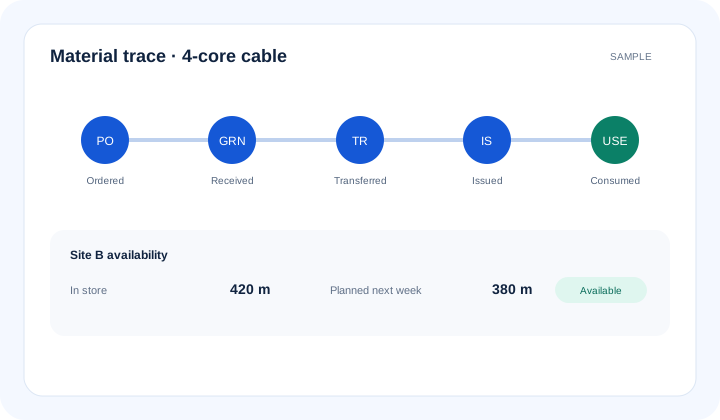
What is construction material inventory management software? Construction material inventory management software tracks materials across warehouses and site stores. Purchased quantity is ordered; received quantity is accepted through a goods receipt note (GRN); available quantity remains in stock; issued quantity leaves the store; consumed quantity is recorded against work; returned quantity comes back for reuse or reconciliation.
The operational problem
A PO shows material purchased, but part remains in transit or at another location. Site planning assumes stock that cannot support today’s work.
Stores record material leaving, but not the activity, package or responsible team. Excess consumption cannot be explained against planned quantities.
One site sends surplus to another through calls and paper notes. Both locations report unreliable balances and procurement may buy again.
Connected EPC records
Each movement retains the material, project, location and source document. Teams can distinguish ordered, received, available, issued, consumed and returned quantities instead of using one ambiguous stock figure.
Core capabilities
View recorded balances by warehouse, project or site store. Prevent central stock from being mistaken for site-ready material.
Record receipts against the authorised purchase order and material. Retain ordered-versus-received quantity context.
Create a GRN with receipt details and configured checks. Pass accepted quantity into the right stock location.
Track dispatch and receipt between controlled locations. Keep the sending and receiving balances accountable.
Record material issued to work and returned to store. Reduce unexplained movement in reconciliation.
Relate supported consumption records to project, BOQ or activity context. Help project teams review excess or shortage signals.
Compare available stock, planned need and pending receipts. Give procurement a clearer replenishment priority.
Product walkthrough
Ordered, received, available, issued, consumed and returned quantities answer different operational questions.
Operational takeawayThe view gives authorised teams a shared record for the next decision; it does not replace physical verification or professional judgement.
Feature workflow
Role-based value
Control receipts, location balances, transfers, issues and returns.
See material readiness and consumption exceptions against upcoming work.
Prioritise orders using shortages, pending receipts and required-at-site dates.
Relate material movement and consumption to project and BOQ context.
Lois AI in this workflow
Lois works with permitted Supista data and does not bypass configured validations, permissions or approvals.
“Do we have enough cable for next week’s work?”
“Prepare a transfer request from Central Store to Site B.”
“Show material issues above recorded consumption.”
Connected EPC lifecycle
Proof and deployment confidence
Implementation maps warehouses, site stores, materials, units, document types and responsible roles. Mobile-friendly access and configurable workflows support site use, while physical verification remains an operational responsibility.
Buyer questions
It tracks material requests, PO-linked receipts, GRNs, location stock, transfers, issues, consumption, returns and reconciliation across EPC projects.
Purchased quantity is covered by a purchase order. Received quantity is material recorded as delivered and accepted through the configured receipt process.
Issued quantity has left the store for a responsible workfront. Consumed quantity is recorded as used against work; unused material may remain at site or return to store.
Yes. Authorised users can view recorded balances and movements by configured warehouse, site store and project context.
Yes. Supported transfers can record dispatch from one location and receipt at another with responsible roles and configured approvals.
No. Lois can summarise permitted inventory records and prepare supported requests, but teams must verify physical stock and normal controls still apply.
Use a real workflow
Bring a material register, store structure or current shortage. We’ll show how receipts, transfers, issues and reconciliation can stay project-linked.
Book a free strategy session with our Automation Experts and discover how Supista’s AI-Composable ERP can transform your operations into a scalable and intelligent system.