
Receipts arrive late
Fuel, transport and urgent purchases stay in wallets or chat messages. Finance learns the project cost weeks after cash was spent.
Construction site expense management software
Built for site teams, project managers and finance. Capture petty cash, fuel, transport, equipment and urgent site purchases with receipts, advances, cost allocation and configured approval.
What is construction site expense management software? Construction site expense management software records field expenses and employee or site advances against the correct project and cost head. It captures receipts, routes claims through configured approvals, tracks settlements and exceptions, and passes approved values into project-cost reporting before month-end reconciliation.
The operational problem
Fuel, transport and urgent purchases stay in wallets or chat messages. Finance learns the project cost weeks after cash was spent.
A receipt has an amount but no project, work package or cost head. Accounts must chase the site or post the cost to a broad bucket.
New cash is issued while prior advances lack supporting expenses or returns. The true employee and site balance becomes unclear.
Connected EPC records
The expense record connects the spender, receipt, project, cost head and advance. Approval establishes whether it can enter the controlled cost view; rejected or incomplete claims remain visible as exceptions.
Core capabilities
Record expenses close to when they happen from a mobile-friendly workflow. Reduce month-end memory and document gaps.
Attach the available receipt or supporting document. Keep the evidence beside the claim for review.
Assign project and configured cost-head context. Improve the usefulness of approved expenses in project reporting.
Relate claims and returned balances to the relevant advance. Give employees, sites and finance a common settlement position.
Apply role, limit and exception controls before posting approved cost. Prevent assisted capture from becoming automatic approval.
Show missing evidence, duplicate-looking details or incomplete allocation for user review. Keep judgement with authorised approvers.
Bring approved site expenses into project and cost-head analysis. Show spend earlier than a month-end spreadsheet.
Product walkthrough
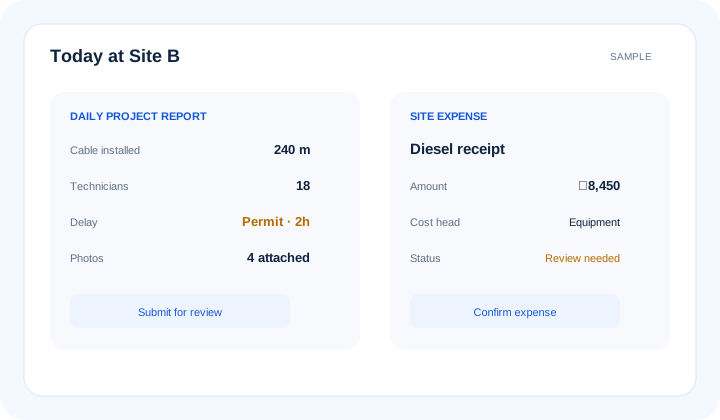
A captured receipt becomes a project cost only after required context, user confirmation and configured approval.
Operational takeawayThe view gives authorised teams a shared record for the next decision; it does not replace physical verification or professional judgement.
Feature workflow
Role-based value
Capture supported costs before receipts and purpose are forgotten.
Review necessity, project allocation and exceptions while context is current.
Control evidence, approvals, advance settlement and reporting status.
See approved site expenses against package or cost-head budgets.
Lois AI in this workflow
Lois works with permitted Supista data and does not bypass configured validations, permissions or approvals.
“Record this diesel receipt for Site B.”
“Show my unsettled advances.”
“Which site expenses are waiting for approval?”
Connected EPC lifecycle
Proof and deployment confidence
Configure expense types, required fields, cost heads, advance references and approval limits around policy. Lois can assist capture from supplied information, but claimants and approvers remain accountable.
Buyer questions
It records site expenses, receipts, project and cost-head allocation, advances, approvals, settlements and approved cost reporting.
Configured categories may include petty cash, fuel, transport, equipment running costs and urgent site purchases, according to the organisation’s policy.
Yes. Supported records can relate expenses and returned balances to an employee or site advance and show outstanding settlement status.
No. Capture creates or prepares a record. Required evidence, permissions, validations and configured managerial or finance approval still apply.
That depends on the configured finance process. Approved expense status can feed project and cost-head reporting while posting controls remain with finance.
Where enabled, Lois can extract supplied receipt details and ask for missing context. The user must verify the draft and configured approvals continue.
Use a real workflow
Bring an expense form, advance process or sample receipt. We’ll show the path from mobile capture through approval, settlement and reporting.
Book a free strategy session with our Automation Experts and discover how Supista’s AI-Composable ERP can transform your operations into a scalable and intelligent system.