
Updates arrive in fragments
Quantities are in a spreadsheet, photographs are in messaging groups and manpower comes by phone. The project manager cannot review one complete daily record.
Construction Daily Project Report software
Built for site engineers, project managers and planning teams. Record the day’s work, resources, material, conditions, blockers and evidence in a consistent mobile-friendly Daily Project Report (DPR).
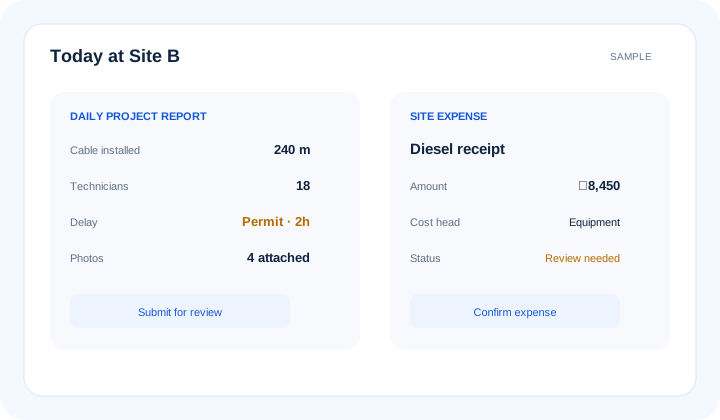
What is construction daily project report software? Construction Daily Project Report software captures structured site facts for each reporting day: completed work, planned and actual quantities, manpower, equipment, material use, weather, delays, photographs, documents and review status. It creates consistent progress evidence for project reporting without inventing missing site information.
The operational problem
Quantities are in a spreadsheet, photographs are in messaging groups and manpower comes by phone. The project manager cannot review one complete daily record.
A team reports an activity complete without planned quantity, actual quantity or measurement context. Planning cannot use the update confidently.
Weather, access, drawing or material delays are mentioned informally. No owner or review status carries the issue into tomorrow’s action list.
Connected EPC records
A DPR links its date and location with activities, quantities, manpower, equipment, material use, weather, delays and attachments. Reviewed facts then support planning, cost, material and management reporting.
Core capabilities
Give authorised site users a practical form for field entry. Reduce dependence on end-of-week spreadsheet compilation.
Record planned and actual quantities against relevant work. Give progress reviewers a clearer reporting basis.
Capture manpower and equipment deployed during the shift. Relate resource context to achieved work.
Record supported material-use information in the project day. Help reconcile site reporting with store and cost records.
Capture weather, access constraints and delay reasons. Preserve facts that may matter in later reviews.
Attach evidence to the relevant DPR instead of an unsearchable message thread. Improve traceability for authorised reviewers.
Route the report through the configured review process. Show missing days and pending DPRs in consolidated reporting.
Product walkthrough
A complete daily record answers what happened, what resources were used, what blocked progress and what evidence supports the update.
Operational takeawayThe view gives authorised teams a shared record for the next decision; it does not replace physical verification or professional judgement.
Feature workflow
Role-based value
Submit one structured record for work, resources, conditions and evidence.
Review daily variance, blockers and accountable actions without chasing updates.
Use reviewed quantity and delay records when assessing actual progress.
Access supporting site context for cost, subcontract and billing reviews.
Lois AI in this workflow
Lois works with permitted Supista data and does not bypass configured validations, permissions or approvals.
“Start today’s DPR for Site B.”
“Add 240 metres completed and 18 technicians.”
“Summarise this week’s site blockers.”
Connected EPC lifecycle
Proof and deployment confidence
Fields, units, required evidence, review roles and reporting schedules can reflect the agreed project process. Mobile access helps capture facts close to the work; authorised teams remain responsible for accuracy and approval.
Buyer questions
It captures structured daily site records for work, quantities, manpower, equipment, material, weather, delays, evidence and review status.
A useful DPR includes the project and date, activities, planned and actual quantities, resources, material use, site conditions, blockers, remarks and supporting evidence.
Mobile-friendly workflows can support authorised site reporting, subject to the configured forms, permissions and available connectivity.
Where configured and reviewed, DPR activity and quantity records can provide current progress context for project and planning views.
Yes. Consolidated views can compare expected reporting with available DPR records and show missing or pending reports.
No. Lois can ask for missing information and prepare a draft from supplied and permitted data. The site user reviews it and normal validations and approvals apply.
Use a real workflow
Bring a daily report format or recent site update. We’ll show how work, resources, blockers and evidence can feed the wider project workflow.
Book a free strategy session with our Automation Experts and discover how Supista’s AI-Composable ERP can transform your operations into a scalable and intelligent system.