Infrastructure Project ERP Software | Highways, Roads & Utilities | Supista

Infrastructure project ERP software

Manage highways, bridges, utilities and infrastructure packages with measurable project control

Coordinate corridor-wise execution, earthworks, pavement construction, drainage, structures, utility relocation, subcontractors, equipment and material supply. Track physical progress, package costs and milestone compliance across geographically distributed sites.

Explore the Live Product
ISO/IEC 27001 certifiedCustom approval workflowsMobile site reportingAI actions with human approval

Industry-specific operating challenges

Where infrastructure projects lose operational and commercial control

Project delays rarely come from one isolated activity. They emerge when engineering, procurement, site execution, quality and commercial records fail to stay connected.

01

Corridor progress is difficult to consolidate

Earthwork, embankment, subgrade, GSB, WMM, bituminous layers, culverts and structures are reported using different measurement units and site formats. Programme teams struggle to produce consistent chainage-wise progress.

02

Material supply does not match construction sequence

Aggregates, bitumen, cement, reinforcement, precast components and utility materials have different procurement and delivery requirements. Stock may be available at one location while another workfront faces shortages.

03

Equipment and subcontractor productivity varies by location

Excavators, graders, rollers, pavers, batching plants, transit mixers and subcontractor crews work across multiple packages. Utilisation, downtime, output and operating cost are difficult to compare.

04

Milestone and cost exposure appears too late

Delayed land handover, utility shifting, approvals, traffic diversions, weather interruptions and long-lead procurement affect critical milestones, but their financial impact is often reviewed after delays have accumulated.

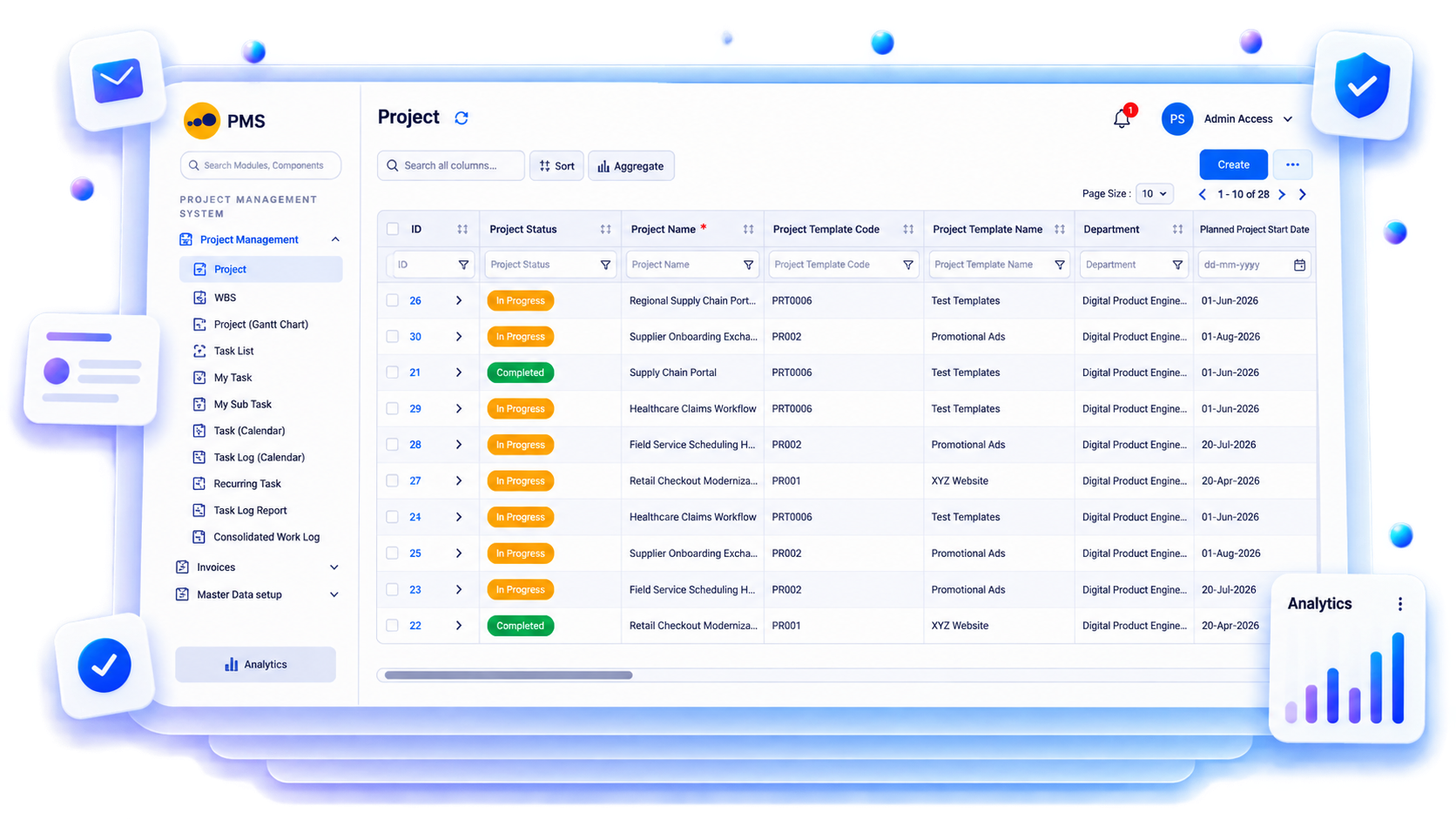
Supista connects the programme, corridor, chainage, structure, work package, BOQ item, subcontractor and cost code so field execution can be consolidated across every project location.

Connected project lifecycle

From initial planning to final project handover

Each project stage generates records that become the starting point for the next. Supista connects these activities without losing their individual ownership, approval history or commercial context.

01

Structure corridors and contract packages

Team records
Project corridors, chainage ranges, bridges, culverts, road sections, utilities, BOQs, WBS and milestone dates
Supista connects
Maps every work package to its location, activity, quantity, contractor and contractual milestone
Management monitors
Chainage-wise progress, package completion, critical milestones and location-specific constraints
Lois can
Compares physical progress across corridors and identifies packages missing their planned output
02

Prepare workfront and statutory readiness

Team records
Land handover, right-of-way, utility shifting, environmental approvals, traffic diversions, permits and construction drawings
Supista connects
Links site clearances and approved drawings to executable workfronts
Management monitors
Blocked chainages, outstanding clearances, approval ageing and upcoming mobilisation requirements
Lois can
Lists chainages and structures that cannot proceed because of pending prerequisites
03

Procure materials and manage logistics

Team records
Aggregate demand, bitumen orders, cement, reinforcement, precast components, dispatches, weighbridge slips, GRNs and inter-site transfers
Supista connects
Maps material demand and deliveries to individual chainages, batching plants and construction packages
Management monitors
Stock coverage, transit quantities, supplier commitments, quality rejections and material shortages
Lois can
Identifies material shortages that threaten upcoming pavement and structural activities
04

Execute civil and utility works

Team records
Earthwork quantities, embankment levels, GSB, WMM, DBM, BC, concrete pours, culvert progress, equipment hours and manpower
Supista connects
Consolidates field quantities by chainage, activity, contractor and approved BOQ item
Management monitors
Daily production, equipment utilisation, layer-wise completion, weather delays and workfront productivity
Lois can
Summarises daily package progress and identifies low-output equipment or workfronts
05

Measure, certify and close milestones

Team records
Survey measurements, quality test results, cube reports, density tests, asphalt test records, joint measurements, milestone claims and RA bills
Supista connects
Links accepted physical quantities and quality approvals with contractual billing milestones
Management monitors
Uncertified work, quality hold points, deductions, retention, receivables and milestone achievement
Lois can
Finds completed work awaiting test clearance, measurement, certification or client billing

Industry-specific ERP capabilities

Operational controls built around real project activities

Bring operational and commercial workflows together without forcing every department into the same reporting format.

Chainage-wise planning

Know exactly where physical work stands

Track earthwork, pavement layers, culverts, bridges and utilities by chainage, location, BOQ item and package milestone.

Explore this workflow →
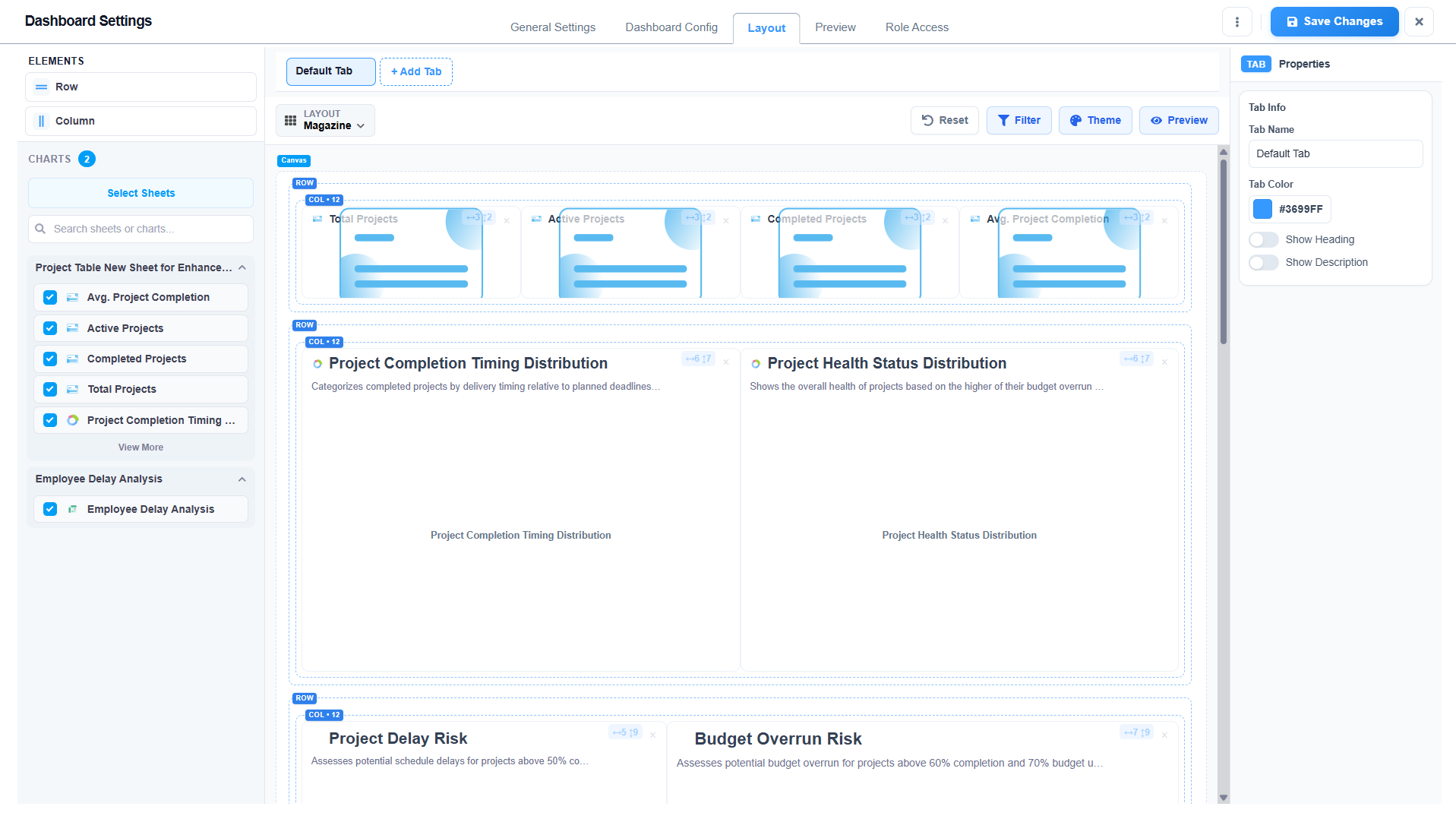
Infrastructure programme and multi-site project dashboard
Multi-location infrastructure project control

Material and logistics

Coordinate supply across distant project locations

Monitor aggregate, bitumen, cement, reinforcement and precast materials through procurement, dispatch, weighbridge, receipt and site consumption.

Explore this workflow →
Supista analytics view for infrastructure projects
Configurable Supista analytics view

Equipment productivity

Measure output against equipment deployment

Compare excavator, grader, roller, paver, batching plant and transit mixer utilisation, operating hours, downtime and achieved quantities.

Explore this workflow →
Infrastructure programme and multi-site project dashboard
Multi-location infrastructure project control

Contract and milestone control

Connect physical completion with contractual payments

Track milestone quantities, quality approvals, joint measurements, RA bills, deductions, retention and client certifications.

Explore this workflow →
Supista analytics view for infrastructure projects
Configurable Supista analytics view

Field-to-office visibility

Capture actual execution, not just reported progress

Site teams can record daily work quantities, manpower, equipment, material consumption, deliveries, delays, inspections and photographs through configured mobile workflows. Project managers and reviewers receive updates with their original project and activity context.

  • Capture activity-wise daily progress and resources
  • Record material receipts, issues and consumption
  • Attach inspection evidence and site photographs
  • Track delays, constraints and responsible owners
  • Route submissions through configured approvals
See mobile reporting →
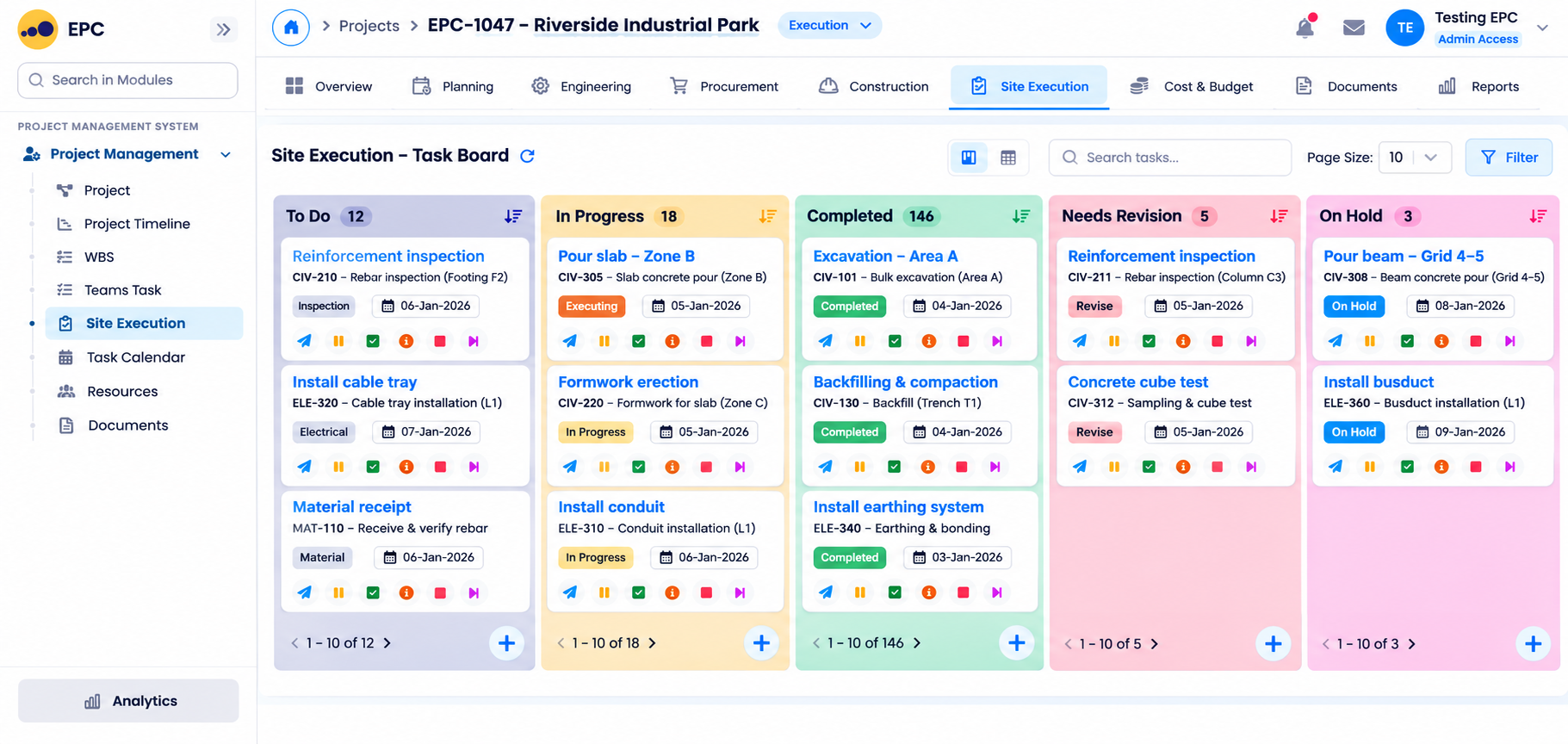
EPC site-execution Kanban board showing work across to-do, in-progress, completed, revision, and on-hold columns
Site tasks move through execution, completion, revision and hold statuses in one project board.

Lois AI inside the ERP

Ask questions using the language of your actual projects

Ask about specific packages, quantities, procurement delays, equipment, site activities and commercial exceptions. Lois works with authorised records and existing approval controls.

Find
“Compare chainage-wise earthwork and embankment progress against this week's targets.”
Compare
“Which road sections are waiting for GSB or WMM material?”
Prepare
“Show DBM and BC quantities completed by each paving subcontractor.”
Find
“Compare grader, roller and paver utilisation across active packages.”
Compare
“Which bridges and culverts have outstanding drawings or utility clearances?”
Prepare
“List overdue bitumen and aggregate deliveries by construction location.”
Find
“Which completed pavement quantities are awaiting density or asphalt quality test clearance?”
Compare
“Show milestone achievement and certified RA billing across all infrastructure packages.”

Human approval stays in control. Lois uses authorised project records, previews important actions and follows your configured roles, permissions and approval matrix.

Explore Lois AI →

Role-based project visibility

Give every department the operational view it needs

Project leadership, planning, engineering, procurement, site execution, quality and commercial teams can work with the same connected project records while retaining responsibility-specific access.

RoleWhat Supista shows
Programme directorsCorridor-wise completion, contractual milestones, package profitability and portfolio-level schedule risk
Project directorsWorkfront availability, chainage progress, contractor productivity and package cost
Planning engineersBaseline programme, chainage-wise look-ahead, critical path and milestone tracking
Construction managersEarthwork, pavement layers, structures, utility works, equipment and daily output
Stores and procurement teamsAggregate, bitumen, reinforcement, cement, precast materials and inter-site logistics
QS and commercial teamsBOQ reconciliation, measurement books, milestone claims, RA bills, deductions and retention

Representative industry workflow

Replace disconnected trackers with connected project records

This illustrates a representative configured workflow, not a claimed customer result or performance guarantee.

Before

Highway and infrastructure teams report quantities by chainage, maintain separate plant registers and track procurement across multiple locations. Management receives consolidated reports only after individual package updates have been manually combined.

With Supista

Supista maintains common corridor, chainage, BOQ, contractor, equipment and material references across all project locations.

Operational result

Programme teams can compare construction output, material readiness, equipment productivity, quality approvals and contractual billing without rebuilding reports for every site.

Configuration and implementation

Configure the ERP around how your projects actually operate

Start with existing BOQs, WBS structures, cost codes, engineering registers, material masters, inspection formats, subcontract agreements and approval processes. Configure the connected workflows around the way your teams execute and manage projects.

01

Import highway, bridge, utility and corridor project structures

02

Configure chainage ranges and location-wise BOQ items

03

Set earthwork, pavement and structure measurement formats

04

Configure aggregate, bitumen and cement material masters

05

Map batching plants, warehouses and inter-site logistics

06

Configure equipment utilisation and DPR reporting

07

Set quality testing and milestone certification workflows

08

Build corridor-wise and package-wise dashboards

Implementation in practical stages
01Map02Import03Configure04Validate05Pilot06Enable07Improve08Scale
Explore configurable EPC ERP →

Start with one real project workflow

Choose an ERP plan around your projects, teams and operating requirements

Review current allowances, implementation scope, configuration requirements and enterprise options.

View EPC ERP PricingTalk to an Expert →

Industry and ERP evaluation questions

Understand how Supista fits your project operations

What does ERP software manage for infrastructure projects?

Supista connects project scope, BOQs, budgets, engineering documents, procurement, material movement, site execution, contractors, quality inspections, billing and cost. Workflows can be configured around the actual disciplines, packages and commercial processes used by the contractor.

Can Supista track committed and actual project cost?

Yes. Supista can compare approved budgets, purchase commitments, subcontractor commitments, actual expenditure, material consumption, certified quantities, client billing and collections by project, package, WBS and cost head.

Can site teams report project progress from mobile devices?

Yes. Configured mobile forms can capture daily quantities, manpower, equipment utilisation, material receipts and issues, workfront constraints, inspection requests, test results, delays and site photographs with appropriate approval routing.

Can Supista manage different contractor and subcontractor workflows?

Yes. Project-specific work orders, scope allocations, agreed rates, measurements, advances, deductions, retention and subcontractor billing processes can be configured around the contractual arrangements.

Can Supista manage procurement and inventory across multiple projects?

Supista can connect material requests, RFQs, purchase orders, vendor deliveries, goods receipts, warehouses, stock transfers, site issues and consumption. Project and location references help teams track material availability against upcoming work.

Can Supista manage technical approvals and inspections?

Configured workflows can manage technical submittals, drawing approvals, inspection requests, quality checklists, testing records, document submissions and approval routing according to the project's agreed process.

Can Supista integrate with accounting software?

Supista can exchange approved project, vendor, procurement, billing and financial records with existing systems. The exact integration scope, data mapping and responsibilities are confirmed during implementation.

How does Lois AI protect project controls?

Lois works with authorised project, procurement, site and commercial records, previews important actions and follows the user's permissions, mandatory fields and existing approval matrix.

Can the system support multiple projects and locations?

Yes. Projects can be organised through configured company, project, site, package, WBS, location and cost structures. Management can review consolidated performance while individual teams work within their assigned responsibilities.

Can we start with one project before rolling it out company-wide?

Yes. A practical implementation can begin with one representative project or package, validate the data structures and approval processes, and then extend the configuration to other projects.

See your actual project process inside Supista

Bring one real infrastructure projects workflow

Bring your BOQ, procurement process, site reporting format, equipment register, inspection workflow or billing process. We will map the relevant handoffs inside Supista and demonstrate how your project information can be connected across departments.

Explore the Live Product
AI-Powered Operational Intelligence for Growing Businesses

Let AI run the operations. You drive the growth.

Book a free strategy session with our Automation Experts and discover how Supista’s AI-Composable ERP can transform your operations into a scalable and intelligent system.