
Requirements arrive incomplete
A site request lacks specifications, quantity, budget context or required-at-site date. Procurement spends critical days clarifying a need that should be purchase-ready.
EPC procurement management software
Built for procurement leaders, project teams and commercial approvers. Carry project, BOQ, budget, work-package and required-at-site context through sourcing, receipt, invoice and payment.
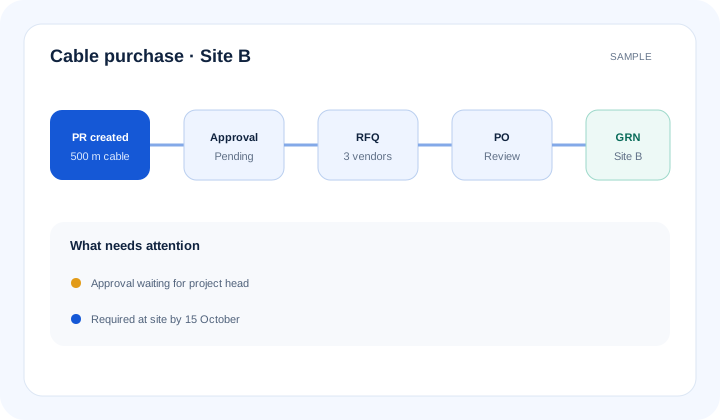
What is epc procurement management software? EPC procurement management software controls project buying from purchase requirement and purchase requisition (PR) through request for quotation (RFQ), quotation comparison, purchase order (PO), goods receipt note (GRN), invoice and payment. Each step retains the project need, approval status, vendor and material-delivery context.
The operational problem
A site request lacks specifications, quantity, budget context or required-at-site date. Procurement spends critical days clarifying a need that should be purchase-ready.
Quotes arrive through email and messaging with different taxes, freight, delivery terms and exclusions. Approvers cannot see whether evaluated costs are comparable.
The purchase order is issued, but dispatch, receipt, invoice and payment status live in separate registers. Site teams chase material without a reliable answer.
Connected EPC records
A purchase should never become a detached finance document. Project, BOQ, budget, work package, material, required-at-site date and vendor context follow it from demand through payment.
Core capabilities
Record what the project needs, where and by when. Reduce avoidable clarification before procurement can begin.
Prepare PRs with project, BOQ, budget and work-package context. Route them through configured roles and approval limits.
Issue and track RFQs against a defined requirement. Keep invited vendors and response status visible to buyers.
Capture comparable commercial fields and supporting documents. Preserve what each vendor offered without relying on inbox searches.
Compare evaluated price, taxes, freight, delivery and configured terms. Flag missing information for professional review.
Create approved purchase orders and retain amendment context. Prevent unapproved changes from becoming an informal buying commitment.
Connect PO quantities with GRNs, invoices and payment status. Give project and finance teams one traceable transaction chain.
Product walkthrough
Each procurement record passes approved project, commercial and delivery context to the next team.
Operational takeawayThe view gives authorised teams a shared record for the next decision; it does not replace physical verification or professional judgement.
Feature workflow
Role-based value
Control PR queues, sourcing, comparisons, orders and supplier follow-up.
See whether critical material will reach site before planned execution.
Receive ordered material and record quantities against the correct PO.
Review invoice and payment context against approved orders and receipts.
Lois AI in this workflow
Lois works with permitted Supista data and does not bypass configured validations, permissions or approvals.
“Prepare a PR for 500 metres of cable for Site B.”
“Record these three vendor quotations.”
“Compare the quotations for evaluated cost and delivery.”
Connected EPC lifecycle
Proof and deployment confidence
Configure requisition fields, approval limits, quotation parameters, purchase-order controls and receipt workflows around the company’s operating policy. Roles and traceable records remain in place when Lois assists users.
Buyer questions
It manages project purchases from requirement and PR through RFQ, quotation comparison, PO, GRN, invoice and payment while retaining project and budget context.
Yes. Supported configurations can retain the project, work package, BOQ or cost context, material details and required-at-site date on the requisition workflow.
Yes. It can compare captured commercial fields such as price, taxes, freight, delivery and configured terms. Missing or unclear details remain subject to buyer review.
No automatic commercial decision is implied. Authorised users evaluate vendors and purchases, and configured validations, permissions and approval paths remain in force.
PO and GRN records can provide ordered and received quantity context for invoice review, subject to the organisation’s configured matching and finance controls.
For supported workflows, Lois can ask for missing information and prepare PR, quotation or comparison drafts. The user reviews them and normal approvals continue.
Use a real workflow
Bring one active requirement, comparison format or delayed material case. We’ll map the same handoffs from project need through receipt and payment.
Book a free strategy session with our Automation Experts and discover how Supista’s AI-Composable ERP can transform your operations into a scalable and intelligent system.