
Evidence arrives after completion
Site work is reported complete, but measurements, photographs or supporting documents are not assembled. Commercial teams cannot prepare a defensible bill pack.
EPC client billing software
Built for quantity surveyors, commercial managers and project directors. Connect billable quantities and milestones with measurement references, documents, approvals, invoices and collections without treating software records as engineering certification.
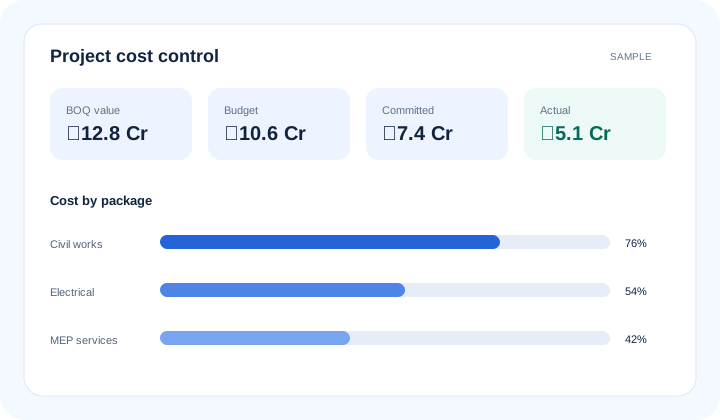
What is epc client billing software? EPC client billing software connects completed quantities or milestones with measurement references, supporting documents, approval status, invoice submission, due dates and collections. It helps commercial teams identify billable and unbilled work, while authorised engineers, clients and commercial reviewers remain responsible for measurements and certification.
The operational problem
Site work is reported complete, but measurements, photographs or supporting documents are not assembled. Commercial teams cannot prepare a defensible bill pack.
A running account bill or milestone submission moves through email with no current owner. Follow-up begins only when cash planning is affected.
Invoices and due dates sit in finance records while project teams track certification separately. Leaders cannot distinguish unbilled work from billed-but-uncollected value.
Connected EPC records
The billing record links the agreed BOQ or milestone with completed work, measurement references, documents and reviewer status. Once authorised, the invoice and collection position remain visible beside the project.
Core capabilities
Compare available completed quantities or milestones with the billing plan. Show commercial teams where a billing review should begin.
Attach or reference measurements behind claimed work. Keep professional verification with authorised project and client teams.
Track the supporting documents required for a submission. Prevent an avoidable missing attachment from holding the entire bill.
Where configured, organise running account bill periods, prior values and current claims. Preserve the agreed commercial structure across submissions.
Show who holds the next review and what remains pending. Give project leaders a practical follow-up list.
Separate completed-but-unbilled work from submitted, approved and invoiced value. Improve cash-flow discussions with traceable status.
Retain invoice dates, due dates and collection status in project context. Help commercial and finance teams coordinate follow-up.
Product walkthrough
The billing workflow makes readiness, certification status and cash follow-up visible without automating professional approval.
Operational takeawayThe view gives authorised teams a shared record for the next decision; it does not replace physical verification or professional judgement.
Feature workflow
Role-based value
Relate quantities, measurements and prior claims to the current bill period.
See unbilled work, missing evidence, pending approvals and deductions.
Review billing readiness and collection exposure alongside project progress.
Follow approved invoices, due dates and collections with project context.
Lois AI in this workflow
Lois works with permitted Supista data and does not bypass configured validations, permissions or approvals.
“What completed work may be billable this week?”
“Which bill packs are waiting for documents?”
“Summarise overdue client approvals and invoices.”
Connected EPC lifecycle
Proof and deployment confidence
Supista can configure billing fields, supporting-document requirements, role access and approval paths. The system records workflow status; it does not independently certify engineering quantities or replace contract administration judgement.
Buyer questions
It connects completed quantities or milestones with measurement references, supporting documents, approvals, invoices, due dates and collections for controlled project billing.
Where progress and billing records share project context, authorised teams can identify work reported complete that has not yet moved into a bill or approved invoice.
No. Authorised engineers, quantity surveyors, clients and commercial reviewers remain responsible for measurement, certification and contractual approval.
Running account bill periods, previous values, current claims and supporting records can be configured where that workflow is included in the agreed implementation.
Yes. Submission, certification, invoice and collection are separate states, helping teams distinguish operational billing delays from overdue receivables.
Lois can find available billable-work records, identify missing information and prepare summaries. Users review its output and all permissions and approvals remain in place.
Use a real workflow
Bring one active BOQ, billing format or pending bill pack. We’ll show how measurements, documents, approvals, invoices and collections can stay connected.
Book a free strategy session with our Automation Experts and discover how Supista’s AI-Composable ERP can transform your operations into a scalable and intelligent system.